Key Takeaways
- Core Web Vitals (LCP, INP, CLS) are confirmed Google ranking signals, and the majority of local business websites in Leeds are currently failing them.
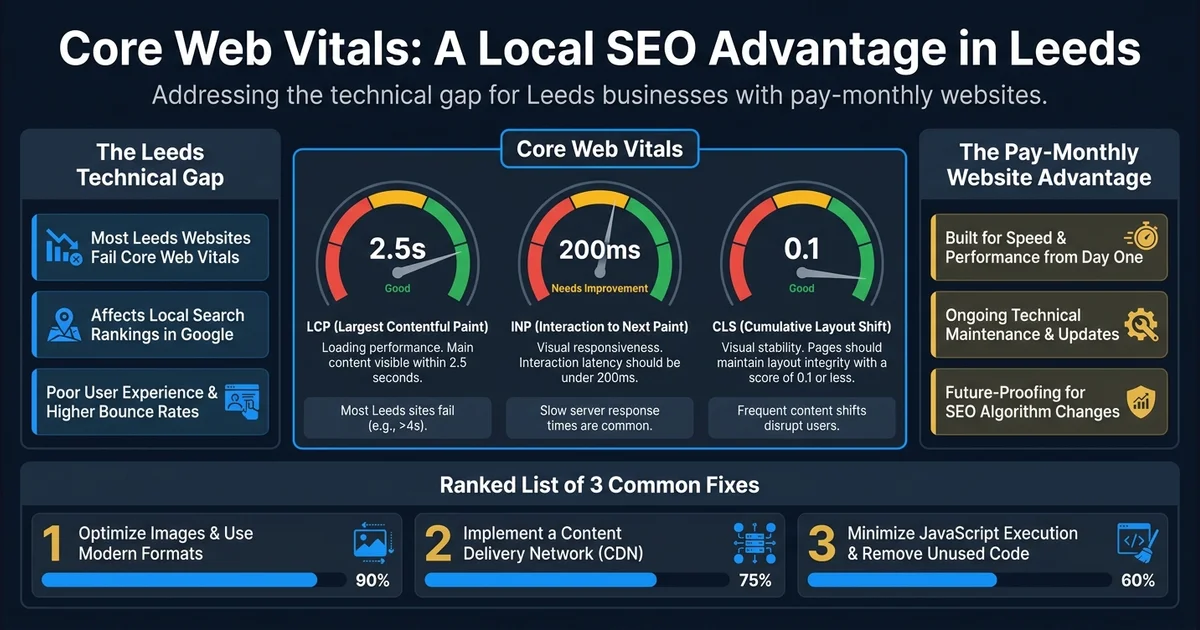
- LCP should be under 2.5 seconds, INP under 200 milliseconds, and CLS under 0.1 to pass Google's Page Experience assessment.
- Most unmanaged WordPress sites fail at least one Core Web Vitals metric on mobile due to oversized images, bloated page builder CSS and JavaScript, and inadequate hosting.
- Passing Core Web Vitals is one of the most accessible competitive advantages for local businesses because most competitors are not meeting the thresholds.
- A pay-monthly website from Leodis Digital targets 90+ on Google PageSpeed Insights for mobile from day one as a build requirement, not a goal.
The Technical Gap Most UK businesses Do Not Know They Have
Ask a business owner in the UK what they know about Core Web Vitals and most will offer a shrug. Ask them whether their website is fast and most will say yes, it seems fine on their laptop. These two things are related, and the gap between them is where a great deal of local search visibility quietly disappears.
Core Web Vitals are Google's standardised measures of real-world page experience. They are a confirmed ranking signal — sites that pass them are given a meaningful advantage in local search rankings over sites that fail. And in the vast majority of markets across across the UK, the majority of local business websites are failing them.
That means passing Core Web Vitals is currently one of the most accessible competitive advantages available to a local business. You do not need more budget, more content, or more links. You need a website that is built to perform. Here is what these metrics actually measure and what your options are.
The Three Core Web Vitals Explained
LCP — Largest Contentful Paint
LCP measures how long it takes for the largest visible element on a page to appear. This is usually a hero image or a large heading. The good threshold is under 2.5 seconds. Needs improvement: 2.5–4 seconds. Poor: over 4 seconds.
For most local business websites in the UK built on WordPress with unoptimised images and shared hosting, LCP times of 4–7 seconds on mobile are common. Every second above 2.5 seconds is suppressing your search rankings relative to a competitor whose site loads faster.
The most common causes of poor LCP: oversized images not converted to modern formats, render-blocking third-party scripts, slow server response times from cheap shared hosting, and unoptimised fonts.
INP — Interaction to Next Paint
INP replaced the older FID (First Input Delay) metric in 2024 and measures how quickly a page responds to any user interaction — every click, tap, or keyboard input, not just the first one. The good threshold is under 200 milliseconds. Needs improvement: 200–500ms. Poor: over 500ms.
Poor INP is most damaging on mobile, where local search is now dominant. A page that feels sluggish — where tapping a navigation link feels like there is a small but noticeable lag — is a page with a poor INP score. This is often caused by too much JavaScript executing on the main thread, blocking the page's ability to respond to user input.
CLS — Cumulative Layout Shift
CLS measures how much the visible layout of a page shifts during loading. When a banner image loads late and pushes all the content down, or when a font loads and reflows text, causing the page to jump — that is layout shift. The good threshold is under 0.1. Needs improvement: 0.1–0.25. Poor: over 0.25.
Poor CLS is a trust-eroding experience. Users who go to tap a button that jumps away at the last moment learn not to trust the site. It also signals to Google that the site was built without care for user experience.
The most common causes: images without explicit width and height attributes, web fonts loaded without a fallback strategy, and dynamically injected content (cookie banners, adverts, live chat widgets) loading after the initial render.
Why Most Local Business Websites Fail
The issue is not ignorance — it is the technical stack that most small business websites are built on.
WordPress with a popular page builder like Elementor or Divi looks visually polished. The builder generates extensive CSS and JavaScript that loads on every page whether it is needed or not. Third-party plugins add analytics scripts, live chat widgets, and cookie banners that load synchronously and block rendering. Images are typically uploaded at full resolution without conversion to modern formats. Hosting is often cheap shared hosting with servers in data centres far from your users.
The result is a site that scores 35–55 on Google PageSpeed Insights for mobile and fails all three Core Web Vitals in field data. It looks professional. It performs poorly. And because the business owner's experience of their own site is via a desktop browser with their images cached from previous visits, they never see the problem.
The Pay-Monthly Website Advantage
This is where the economics of website performance become very clear.
A properly built website — one that passes Core Web Vitals, loads in under 2.5 seconds on mobile, and maintains those scores without ongoing technical intervention — requires a different approach from the typical WordPress build. It requires a modern, lightweight framework with no unnecessary JavaScript, properly optimised images as standard, UK-based hosting with fast server response times, and a build process that treats performance as the primary constraint, not an afterthought.
At Leodis Digital, every website we build — including all pay-monthly websites — targets 90+ on Google PageSpeed Insights for both mobile and desktop. This is not aspirational; it is a technical standard we maintain. The benefit to you is a website that starts with a structural SEO advantage over the majority of your local competitors.
The pay-monthly model makes this standard accessible to businesses that could not previously afford a properly built site. You do not need to choose between a cheap, poorly-performing WordPress site and an expensive agency build. For a fixed monthly fee, you get a fast, professionally built, technically excellent website — and it is maintained to that standard for the duration of the contract.
What to Do If Your Site Is Failing
Run your website through Google PageSpeed Insights right now. Look at the Field Data section. If any of the three Core Web Vitals show as "Poor" or "Needs Improvement," you have a measurable ranking disadvantage that your competitors may not have.
Your options are:
Fix the existing site. For a WordPress site, this typically involves image optimisation, eliminating render-blocking resources, adding server-side caching, and potentially migrating to better hosting. This can meaningfully improve scores but rarely achieves the same baseline as a site built correctly from the start. Gains are also fragile — a plugin update or a new piece of content can undo performance work if nobody is actively monitoring it.
Rebuild on a modern, performance-first stack. The cleanest solution. A rebuild on a lightweight, performance-optimised framework will score higher and maintain those scores more sustainably than a patched WordPress build. With a pay-monthly website, this does not require a large upfront investment. You get a site built to pass Core Web Vitals from day one, maintained to that standard for as long as you remain a customer.
For more on the specific fixes that improve Core Web Vitals scores, see our PageSpeed practical guide. For the commercial context — what a slow website is actually costing you in lost leads — see our article on how a slow website costs UK businesses money.
If you are not sure where to start, get in touch with Leodis Digital. We will run a free technical assessment of your current site and give you a plain-English summary of what it is costing you in search visibility.
Frequently Asked Questions
How do I check if my website passes Core Web Vitals?
Go to Google PageSpeed Insights (pagespeed.web.dev) and enter your website URL. Look at the "Field Data" section at the top — this shows real user data collected by Chrome. If any of the three Core Web Vitals metrics show "Poor" or "Needs Improvement," your site is being penalised in rankings relative to competitors who pass. The "Lab Data" section below is useful for diagnosing specific issues but is a simulation, not the ranking signal.
Can a pay-monthly website actually score well on Core Web Vitals?
Yes — and it should be a non-negotiable requirement. Every website Leodis Digital builds, including all pay-monthly websites, targets 90+ scores on Google PageSpeed Insights for both mobile and desktop from the point of launch. This is achieved by building on a modern, lightweight framework rather than WordPress with bloated plugins, by properly optimising all images, and by avoiding render-blocking third-party scripts. You do not need to spend a fortune to have a technically excellent website.
Will passing Core Web Vitals guarantee I rank number one in Leeds?
No. Core Web Vitals are one of many ranking signals. Passing them removes a penalty and gives you a foundation to compete, but ranking well also requires relevant content, local authority signals, and a strong Google Business Profile. Think of Core Web Vitals as the entry ticket — you need them to compete seriously, but winning requires more besides. The good news is that most of your local competitors are not passing them, so it is an immediate advantage.
My website looks modern. Does that mean it passes Core Web Vitals?
Not necessarily, and this is one of the most common misconceptions. A modern-looking website built on a heavy page builder like Elementor or a JavaScript-heavy theme can look impressive while performing poorly on Core Web Vitals. Visual design and technical performance are independent. Many visually attractive sites built on WordPress load in 5–7 seconds on mobile and have CLS issues from fonts and images loading after the initial render. Check PageSpeed Insights — do not assume from appearance.
Found this useful? Share it.